Table of Contents
Burn a DVD in Video deluxe
– here's how it's done.
Want to burn videos to DVD using software? Keep reading to learn how!
- Open Video deluxe and drag & drop to import video files from the Media Pool. If you just want to burn a single video file to disc, you can skip the next steps and go to "5." below.
- To compile and use several video files as scenes in one film, drag them one-by-one to track 1 above and arrange them in the correct order.
- To add another film to the DVD, right-click on the title tab above track 1 and select "New movie". Another empty editing view will then appear. Drag one or several videos into this new editing view and arrange them in the order you want.
- Continue in this manner to add all the films that you want to burn to DVD.
- Above right, switch to the DVD burner interface and burn the project either directly to DVD, or first create a selection menu, which can be used later with a remote control when watching the DVD to jump between films and scenes.
Once the burning is complete, you'll have a finished DVD that can be watched on any standard DVD player.

Burn DVDs with Video deluxe Plus, the video editing program for ambitious movie makers:
- Import all common video formats
- Burn video files directly to DVD
- Combine multiple video files into a movie on DVD
- Burn several files simultaneously to video DVD
- Design your own DVD selection menu or simply choose a template
- Burn any type of data DVD
Video deluxe:
the ultimate DVD burning software
People are always on the lookout for high-quality DVD burning software. They might want to burn video to DVD, be these movies they've filmed using camcorder or video files from their smartphone, so they can present them on TV. Or if someone has a number of longer feature films, they might want to burn them to DVD, for instance as a backup of a DVD they purchased. Alternatively, they may just want to create a backup: burning a DVD is a useful way to store files.
Some of these tasks can be done with free DVD burning software, but these are often rather complicated in terms of usage. Video deluxe, on the other hand, offers all the tools you need for burning movies to DVD – plus, it's incredibly easy to use. Video deluxe enables users to:
- Burn their own video files to DVD.
- Load several video files in different formats, compile them into longer movies and then burn to DVD – ideal for combining short video clips from your smartphone.
- Burn movies to DVD. Any given film can contain between 1 - 99 video files: You can jump between all films and scenes on the DVD later using a remote control.
- Burn data DVDs containing any kind of file or folder
In this way, Video deluxe offers total flexibility for all DVD burning tasks.
But it's is not only a complete solution for burning a movie to DVD – it's also comprehensive video editing software. So before you burn a video, you can cut it, optimize its image and sound or enhance it using additional content such as subtitles, music, an intro or a trailer.
It can all be done quickly and easily – here's our guide to show you how.
Burning a video file to DVD
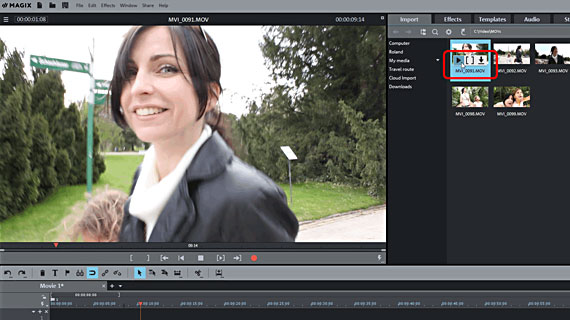
- Open Video deluxe and in the Media Pool go to the folder containing your video file. Click on the little arrow on each file to preview it.
- Drag and drop the video file into the top track. Move it left back to the start in order to close any gaps.
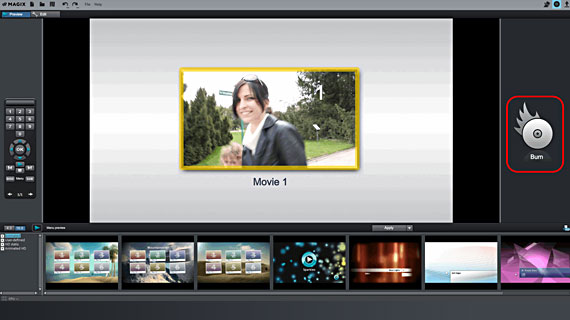
- Above right, click on the button with the little disc symbol to switch to the burn interface.
- Click "Burn" and select "DVD" as the disc type. The "Burn DVD" dialog will appear.
- Insert a blank DVD disc in the drive and click to start the burn process.
It won't be long before you'll have your finished DVD with your video in your hands, ready for watching on any standard player.
Burning multiple video files as a movie to DVD
- You can access and control video files via the Media Pool.
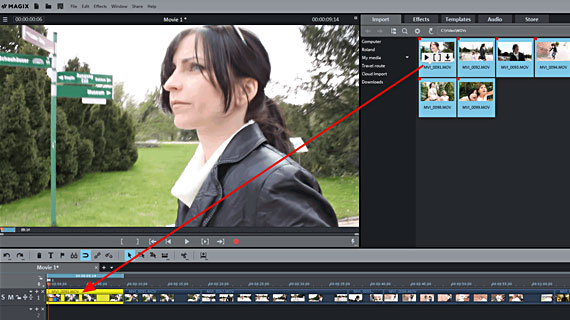
- Import all the video files that you want to combine into a single film. In the Media Pool, hold down the Ctrl key and select the files one-by-one, then drag the entire selection to the top track while holding down the mouse button. You can also simply drag the video files into the track one-by-one.
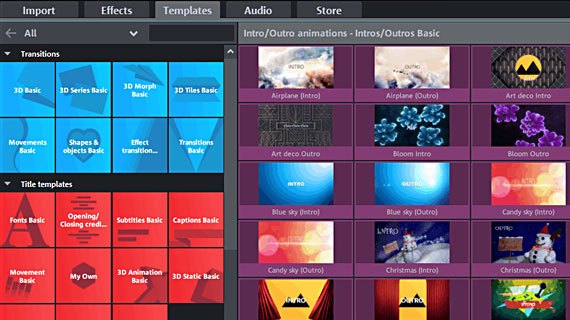
- If you want to cut or edit videos in any way before using the DVD burner tool, you can use some of the many editing functions, effects and templates offered by Video deluxe. To make a cut at the position of the playback marker, press T. Effects for optimizing sound and image and complete film looks can be found in the Effects section of the Media Pool. You can access subtitles, transitions, intros or trailer templates under the Templates tab.
- The video files that appear in the track are the scenes from your film. Move the first scene left back to the start in order to close any gaps. Then arrange the other scenes back-to-back in the right order on the track, making sure there are no gaps.
- To finish, go to the Burn interface as described above and start the DVD burning process.
Burn several movies to DVD
- Load one or several video files to your first movie.
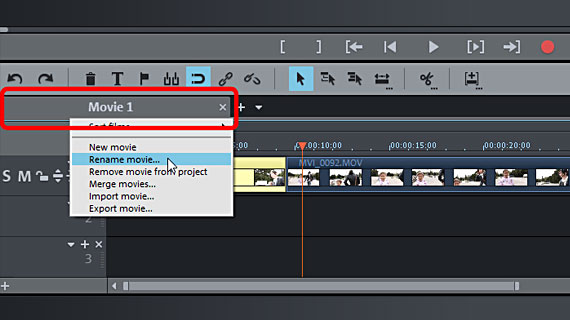
- Right-click on the movie tab above the first track and give your film a name so you'll be able to find it in the selection menu of the DVD later.
- Right-click again on the movie tab and choose the option "New movie". A new, empty editing view containing a second film will be created. You can still access the first film via its movie tab.
- As described above, load one or several video files for your second movie.
- Continue creating as many films as you wish or according to the amount of storage space on the DVD. 90 minutes approx. is a guideline figure for the entire playback time of all films on the DVD.
- Once you are happy with your video, you can go to the "Burn" interface.
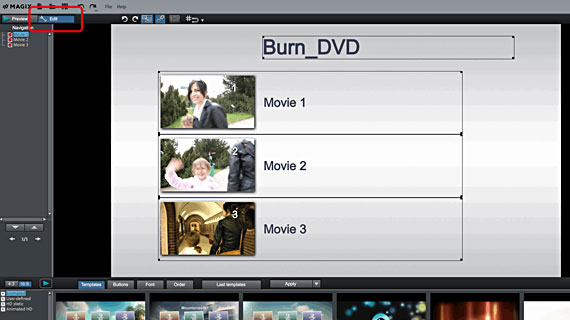
- If you want to burn multiple films, we recommend you create a selection menu for the disc before burning the movies to DVD. The selection menu enables you to play all films on the DVD later using a remote control. To create one, click above left to switch to "Edit" mode.
- In the burn view below, you can access all the menu templates offered by the program. These make creating a selection menu easy. In the submenu, you'll see individual video files as scenes or film chapters. You can redesign any menu element or button the way you want or also add new elements.
- When your selection menu is finished and you're happy with the way it looks, start the DVD burn process.
Burn any files to DVD
A data DVD is somewhat different to a video DVD as we have described it so far. Data DVDs are only used as data storage media to burn any kind of folders or any file e.g. mp4 to DVD in order to transport them, back them up or for other reasons. This simple task can be done using a range of programs. But Video deluxe is software that does the job easily, meaning that you can use Video deluxe as DVD burning software for all your projects.
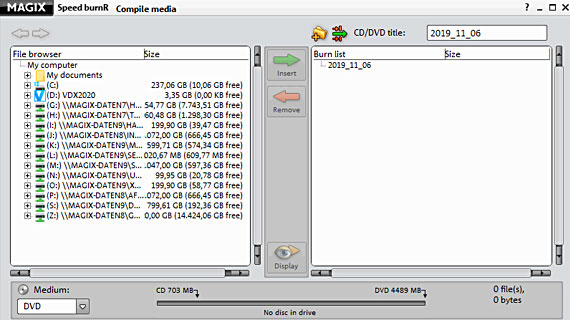
- In the File menu, select Burn CD/DVD > Manually compile files. The MAGIX Speed burnR utility program will open.
- Group together the files you want to burn using the file browser.
- Click "Burn" to open the actual burn dialog. You can check the settings for the DVD burner here and modify them if necessary.
- Then click on "Start burning".
Video deluxe Plus: One of a kind – just like your movies.
- Smooth proxy editing in up to 4K quality
- Up to 1500 effects and music
- Automatic program wizards
- Burn your movies to DVD, AVCHD or Blu-ray