🔥 JUST RELEASED:
Discover all features
Video deluxe combines intuitive editing, effects and color grading in one smart interface.
Editing features
Video deluxe keeps editing simple and intuitive with powerful tools in a streamlined workflow.

Edit videos
Cut, trim and arrange your footage with precision. A clear timeline and practical tools give you full control over every scene while keeping your workflow efficient.

Full track handling
Take full control of your timeline. Sort, rearrange and duplicate tracks freely, and cut, copy or delete them as needed. Color code tracks and objects to keep even complex projects organized.

Frame-precise keyframes
Control effects like movement, color and speed with frame accurate keyframes. Set markers exactly where you need them and fine tune every scene with precision.

Wizards
Import, optimize and start editing in minutes. Use smart wizards to automate tasks or fine tune settings your way. Fast results without slowing down your workflow.

×
Multicam editing
Edit events filmed with multiple cameras effortlessly. In multicam mode, preview up to four recordings at once and switch between angles with a click. Video deluxe handles the cuts automatically as you go.

×
Find and close gaps
Keep your timeline clean with automatic gap detection. The tool finds and closes empty spaces in your project instantly, saving valuable time, especially in larger edits.

×
Editing with real-time preview
Preview and trim your footage directly in the timeline. Hover, set cuts and refine clips instantly without interrupting your workflow. Perfect for handling large amounts of material and moving through rough cuts faster.

360° workflow
Edit 360° videos with a complete toolset built for immersive content. No 360° camera? Create dynamic 360° camera moves in photo panoramas and add a new perspective to your projects.
Optimization tools
Rescue imperfect footage, fine tune colors and transform the overall look of your video.

×
Professional video stabilization
Stabilize shaky footage in seconds. Powered by technology from the pro-level editor VEGAS Pro, the one click stabilization delivers smooth, high quality results.

Color grading
Shape the mood of your video with precise color grading tools. Adjust tones and fine tune individual hues to create a distinct, cinematic look that fits your story.

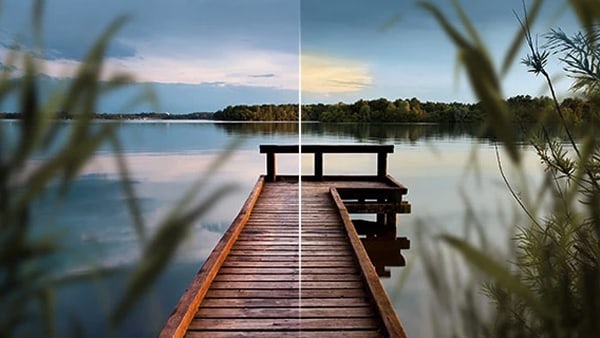
Deep Color
Edit in 16-bit Deep Color for greater precision and smoother gradients. Achieve richer detail and natural looking results without visible banding.
×
Automatic shot match
Match colors, brightness and contrast across your footage in seconds. The automatic shot match tool aligns clips to your best looking shots and keeps your project visually consistent.

Movie looks
Apply ready made film looks to shape the mood and atmosphere of your footage. Choose from pre set styles or create your own signature look with a single click.
Creative design
Highlight key moments and shape the mood with effects built for every project.

×
1.500 effects, titles & transitions
Explore a wide range of high quality intros, outros, titles, transitions and ready to use templates, including travel effects. New content is added regularly to keep your projects fresh.

×
Dynamic title animations
Add movement and personality with customizable title templates. Adjust size, style and fonts to match your footage and create a consistent look.

×
Layer masks
Use versatile layer masks to highlight key elements, build creative compositions and design distinctive titles for more polished transitions and effects.

×
Slow motion & time lapse
Create smooth slow motion and dynamic time lapse effects by adjusting clip speed. Intelligent frame interpolation generates additional frames for fluid playback, even from lower frame rate footage.

×
MAGIX Travel Maps
Visualize your journeys with customizable route animations. Choose from nine map styles or import your own, add locations and transport modes, and highlight each stop with photos and titles.
Impressive performance
Smooth previews, quick renders and reliable performance let you edit without interruption.

×
Infusion Engine
Video deluxe is powered by INFUSION Engine 3 and fully optimized for modern graphics cards from Intel, NVIDIA, and AMD. Enjoy smooth real-time previews during editing and noticeably faster exports.

8K UltraHD support
Edit and export in up to 8K resolution. The INFUSION Engine enables smooth real time playback, even with high resolution footage.

Extensive format support
Import, edit and export a wide range of formats with ease. Mix different file types in one timeline and work seamlessly with footage from action cams, camcorders, smartphones and drones.
Pricing
Get Video deluxe now
Find the Video deluxe version that fits your needs.
New Version 🔥


Plus
Video deluxe 2027Easy video editing with AI tools, templates and creative effects.
- Intuitive video editing
- 2,000+ effects, fades, and templates
- Offline AI voiceovers & subtitles
- AI-powered image optimization
- Precise color grading & LUTs
- Royalty-free stock content
Included:
BEST VALUE
New Version 🔥

Premium
Video deluxe 2027Extended toolkit with object removal and high-quality music content.
- Video deluxe Premium, plus:
- proDAD Hide V2 Bundle
- 1,000 versatile soundtracks Bundle
- AI-powered object removal
- More AI credits
- More stock downloads
Included in the bundle:
New Version 🔥

Ultimate
Video deluxe 2027Complete editing suite with advanced tools and content for polished videos.
- Video deluxe Premium, plus:
- 5 powerful proDAD add-ons Bundle
- Cinema LUTs Bundle 5 Bundle
- Ultimate Content Pack Bundle
- 3,000 versatile soundtracks Bundle
- 1,700 exclusive effects
- Powerful image stabilization
- Professional title animations
- More AI credits
- More stock downloads
Included in the bundle:
Plug-ins and additional software can only be activated on one device. When repurchasing a plug-in you’ve already registered, you will not receive a new serial number.
|
Plus
Buy now
|
Premium
Buy now
|
Ultimate
Buy now
|
|
|---|---|---|---|
| proDAD VitaScene V5 PRO |
Plus
Not included
|
Premium
Not included
|
Ultimate
Included
|
| proDAD Mercalli V6 |
Plus
Not included
|
Premium
Not included
|
Ultimate
Included
|
| proDAD Hide V2 |
Plus
Not included
|
Premium
Included
|
Ultimate
Included
|
| proDAD ProDRENALIN V2 NEW |
Plus
Not included
|
Premium
Not included
|
Ultimate
Included
|
| proDAD Heroglyph V5 NEW |
Plus
Not included
|
Premium
Not included
|
Ultimate
Included
|
| Ultimate Content Pack |
Plus
Not included
|
Premium
Not included
|
Ultimate
Included
|
| Soundpacks NEW |
Plus
Not included
|
Premium
1
|
Ultimate
3
|
| Cinema LUTs Bundle 5 NEW |
Plus
Not included
|
Premium
Not included
|
Ultimate
Included
|
| Custom media tags NEW |
Plus
Included
|
Premium
Included
|
Ultimate
Included
|
| Smart media search NEW |
Plus
Included
|
Premium
Included
|
Ultimate
Included
|
| HiDPI program interface |
Plus
Included
|
Premium
Included
|
Ultimate
Included
|
| In-app Store & new Media Pool |
Plus
Included
|
Premium
Included
|
Ultimate
Included
|
| OpenFX support |
Plus
Included
|
Premium
Included
|
Ultimate
Included
|
| Archive & restore |
Plus
Included
|
Premium
Included
|
Ultimate
Included
|
| Wireless media transfer |
Plus
Included
|
Premium
Included
|
Ultimate
Included
|
| Offline AI voiceovers & subtitles NEW |
Plus
Unlimited
|
Premium
Unlimited
|
Ultimate
Unlimited
|
| AI subtitles (Speech-to-Text) |
Plus
1 hour¹
|
Premium
2 hours¹
|
Ultimate
4 hours¹
|
| AI voiceovers (Text-to-Speech) |
Plus
20,000 characters¹
|
Premium
30,000 characters¹
|
Ultimate
180,000 characters¹
|
| MAGIX Content |
Plus
120 downloads¹
|
Premium
180 downloads¹
|
Ultimate
580 downloads¹
|
| Cloud storage |
Plus
1 GB
|
Premium
2 GB
|
Ultimate
2 GB
|
| Media Share |
Plus
Included
|
Premium
Included
|
Ultimate
Included
|
| AI Face Recognition NEW |
Plus
Included
|
Premium
Included
|
Ultimate
Included
|
| AI Colorize |
Plus
Included
|
Premium
Included
|
Ultimate
Included
|
| AI Style Transfer |
Plus
Included
|
Premium
Included
|
Ultimate
Included
|
| AI image enhancement |
Plus
Included
|
Premium
Included
|
Ultimate
Included
|
| AI Media Management |
Plus
Included
|
Premium
Included
|
Ultimate
Included
|
| Highlighted subtitles |
Plus
Included
|
Premium
Included
|
Ultimate
Included
|
| Infusion Engine 3 |
Plus
Included
|
Premium
Included
|
Ultimate
Included
|
| Multimedia tracks |
Plus
200
|
Premium
200
|
Ultimate
200
|
| High-speed timeline |
Plus
Included
|
Premium
Included
|
Ultimate
Included
|
| Track and object colors |
Plus
Included
|
Premium
Included
|
Ultimate
Included
|
| J and L cuts |
Plus
Included
|
Premium
Included
|
Ultimate
Included
|
| Automatically remove gaps |
Plus
Included
|
Premium
Included
|
Ultimate
Included
|
| Multicam editing |
Plus
Up to 4 cameras
|
Premium
Up to 4 cameras
|
Ultimate
Up to 4 cameras
|
| Preview rendering |
Plus
Included
|
Premium
Included
|
Ultimate
Included
|
| Beat-based video editing |
Plus
Included
|
Premium
Included
|
Ultimate
Included
|
| Movie & editing templates |
Plus
75
|
Premium
75
|
Ultimate
75
|
| Change track height |
Plus
Included
|
Premium
Included
|
Ultimate
Included
|
| 8K Ultra HD support |
Plus
Included
|
Premium
Included
|
Ultimate
Included
|
| Proxy video editing |
Plus
Included
|
Premium
Included
|
Ultimate
Included
|
| Flexible rotation point |
Plus
Included
|
Premium
Included
|
Ultimate
Included
|
| Multichannel sound |
Plus
Stereo
|
Premium
Included
|
Ultimate
Included
|
| Automatic loudness adjustment |
Plus
Included
|
Premium
Included
|
Ultimate
Included
|
| Audio scrubbing in the timeline |
Plus
Included
|
Premium
Included
|
Ultimate
Included
|
| Dehisser |
Plus
Included
|
Premium
Included
|
Ultimate
Included
|
| Music Editor 3.0/Mastering Suite |
Plus
Included
|
Premium
Included
|
Ultimate
Included
|
| RAW support NEW |
Plus
Included
|
Premium
Included
|
Ultimate
Included
|
| MiniDV / HDV camcorder support |
Plus
Included
|
Premium
Included
|
Ultimate
Included
|
| AVCHD camcorder support |
Plus
Included
|
Premium
Included
|
Ultimate
Included
|
| Cloud import tool |
Plus
Included
|
Premium
Included
|
Ultimate
Included
|
| UHD & 8K media import |
Plus
Included
|
Premium
Included
|
Ultimate
Included
|
| HEVC support (10-bit import) |
Plus
Included
|
Premium
Included
|
Ultimate
Included
|
| XAVCS support |
Plus
Included
|
Premium
Included
|
Ultimate
Included
|
| HEIF image import |
Plus
Included
|
Premium
Included
|
Ultimate
Included
|
| Automatic alignment for vertical videos |
Plus
Included
|
Premium
Included
|
Ultimate
Included
|
| 360° recordings including stitching |
Plus
Included
|
Premium
Included
|
Ultimate
Included
|
| Stereo 3D recordings |
Plus
Included
|
Premium
Included
|
Ultimate
Included
|
| Screen recording |
Plus
Included
|
Premium
Included
|
Ultimate
Included
|
| Intel® Hyper Encode technology |
Plus
Included
|
Premium
Included
|
Ultimate
Included
|
| DVD, AVCHD & Blu-ray burning with animated menus |
Plus
Included
|
Premium
Included
|
Ultimate
Included
|
| Export to smartphones and tablets |
Plus
Included
|
Premium
Included
|
Ultimate
Included
|
| Upload to Vimeo |
Plus
Included
|
Premium
Included
|
Ultimate
Included
|
| Upload to YouTube |
Plus
Included
|
Premium
Included
|
Ultimate
Included
|
| Batch conversion |
Plus
Included
|
Premium
Included
|
Ultimate
Included
|
| AVCHD smart rendering |
Plus
Included
|
Premium
Included
|
Ultimate
Included
|
| Batch export for chapters |
Plus
Included
|
Premium
Included
|
Ultimate
Included
|
| Stereo 3D export to disc, file or YouTube |
Plus
Included
|
Premium
Included
|
Ultimate
Included
|
| 360° video export as file or to YouTube |
Plus
Included
|
Premium
Included
|
Ultimate
Included
|
You can redeem your Hub voucher for at least one year after purchasing the product license. Once redeemed in the product's Hub window, your Hub credit remains valid indefinitely.
* To increase credits for AI and Hub/Cloud functions, click here.
Frequently asked questions
1. What can I do with MAGIX Video deluxe?
MAGIX Video deluxe is an intuitive video editing software for both beginners and experienced users. You can edit your footage and audio, and apply effects, transitions, and titles with ease.
2. How can I upgrade to MAGIX Video deluxe?
You can upgrade directly through the MAGIX website. Just choose your preferred version from the orderbox and follow the guided steps.
3. Is MAGIX Video deluxe an easy video editing program?
Yes, MAGIX Video deluxe is one of the most user-friendly video editing programs available. It's perfect for beginners thanks to its intuitive interface, drag-and-drop functionality, and ready-to-use templates.
4. Which video formats does MAGIX Video deluxe support?
MAGIX Video deluxe supports all common formats, including MP4, AVI, MOV, and more. Find more info under specifications.
5. How much does MAGIX Video deluxe cost?
For information on pricing, simply check the orderbox above.
Select your language