MAGIX MP3 deluxe MX
Save
50 %
  • MAGIX MP3 deluxe MX
  • + MAGIX PC Backup MX
  • Exclusively in the MAGIX Shop
  • Valid until 10 April, 2012
regularly £79.98
£39.99
Prices include VAT

Press Comment

GADGETSPEAK, 11/2010

""....does an excellent job of managing and organising your digital musical collection."

Users on the Subject ...

... organise music with MAGIX!

Test Version For Free

How To Organise Music Intelligently

How to organise music doesn't just play an important role for music enthusiasts. Constantly increasing music archives and inconsistent naming schemes for files cause many users to lose an overview of their own music collection. Management essentially starts with the transfer of music, for example from a CD to the computer, which is often referred to as grabbing or ripping in English. A choice needs to be made first about which format or which codec should be used to transfer the music. If the purpose is primarily to be able to listen to music later on your PC, then compression is sufficient, which is also referred to as "data reduction" or a "compression algorithm“. This means that data in general is not able to be reconstructed completely without error. However, this is not any different with other forms of data compression, since specific qualities of the human perception of sound are considered to minimize any loss. This enables music in the form of MP3 (other examples of audio formats are Ogg Vobis or AAC) to be burned to a CD; normally, CDs would use the conventional WAV format.

Organise Music With MAGIX MP3 deluxe

Organise Music With MAGIX MP3 deluxe

Transferring CDs to your PC also requires the right music management software: MAGIX MP3 deluxe offers convenient transferring and special tools that are very helpful for managing and archiving audio files. The quick search feature enables lost treasures to be recovered, one-time titling simplifies the structured naming scheme for files, and mufin technology enables tracks to be discovered that are musically similar to another.

ID3 tags are important for finding music conveniently and comfortably on your PC. This extra information (metadata), which is contained in MP3 audio files, helps users identify the band, artist, or style of the music. Before there were ID3 tags (by the way, ID3 stands for Identify an MP3), file names or folder names needed to include this extra information. The consequences were long and impractical file names that made music management more complicated than it needed to be. These circumstances lead to the development of adding metadata in a reserved part of the file information included with the file.
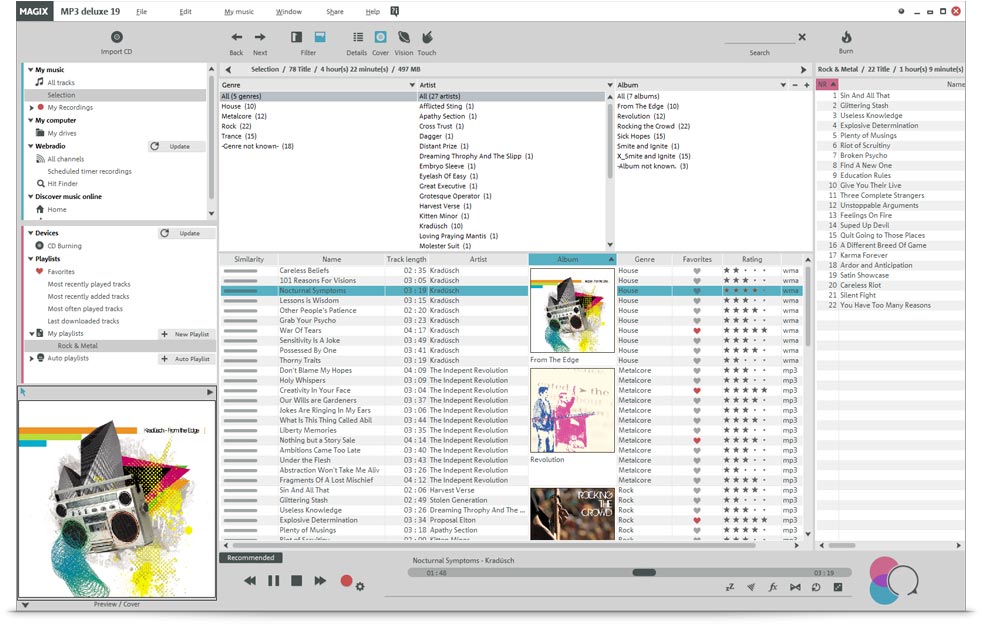
But how does the user properly "tag" their audio files to make them easier to manage? MAGIX MP3 Deluxe provides two interesting approaches to this challenge – the "freedb " database on the one hand, which offers information about the contents of audio CD albums. The basis for this identification is a process which calculates a table of contents for an album CD. Essentially, the start sector and lengths of the individual tracks provides a checksum that is able to be compared to the information in the database to get details about tracks, artist, release year, and genre for a certain CD. On the other hand, MAGIX MP3 Deluxe is able to use "AudioID" to identify a song's particular digital signature. If the user does not know any information about a song, then the song simply needs to be selected and analyzed with "AudioID“ via the context menu. The musical fingerprint of the selected song is analyzed and compared online with the AudioID database. if the structure is recognized, then the information is sent back to the user and an ID3 tag is created for the cong.

An intelligent way to organise music helps users find music quickly, and is therefore not just a topic for music nuts, but it's also important for everyone who owns a digital music collection.

 
Please choose your country
Asia-Pacific