Explorer toutes les fonctions
Vidéo Pro X combine outils avancés de montage, de couleur et d'audio.
Fonctions d'édition
Tout pour éditer efficacement, rester organisé et peaufiner votre récit.

×
Couper et ajuster
Cut and preview footage directly on the timeline with dynamic real-time feedback for precise trimming and smooth adjustments.
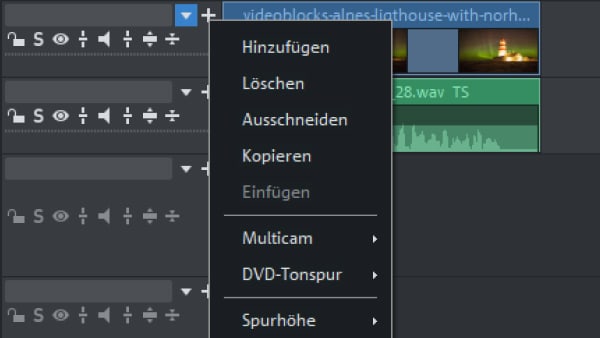
Gestion complète des pistes
Reorder, duplicate, or delete tracks at any time, even after editing, and position media precisely using active target tracks and clear color coding.
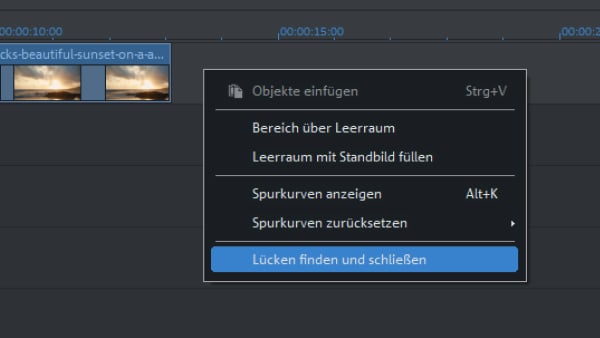
Trouver et combler les trous
Automatically detect gaps on your timeline and close them with a single click, ensuring clips merge seamlessly without unwanted black frames.
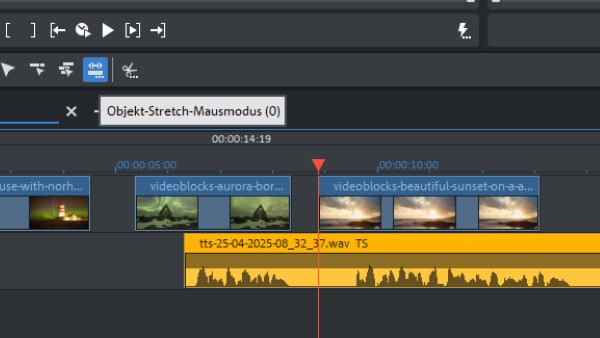
Time stretching
Adjust the length of video and audio clips directly on the timeline by stretching or compressing them, while audio keeps its original pitch.

Séquences imbriquées
Group clips into structured sequences that can be added as single objects to your timeline and enhanced with effects applied to the entire sequence.

Beat-based editing
Use snap markers to align cuts precisely with the rhythm of your music, ensuring scene changes match the beat for a perfectly timed edit.
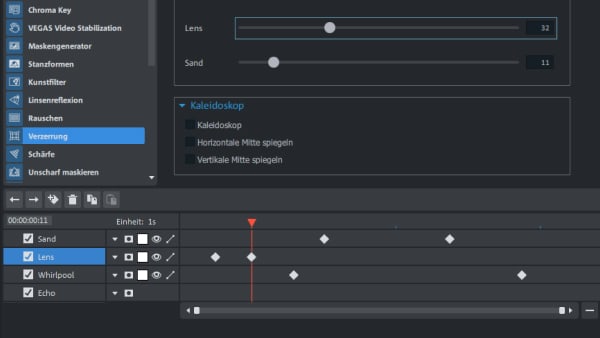
Keyframe animation
Animate effects and properties over time using keyframes to create smooth, customized motion and precise visual transitions.

Édition multicaméra
Edit up to nine camera angles in real time, switch perspectives live in the preview window, and sync footage automatically using audio analysis.
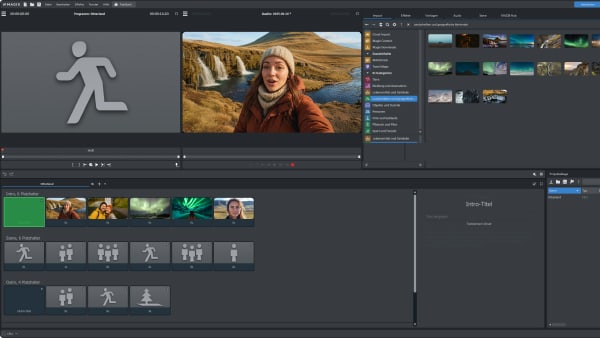
Action templates
Choose from a large selection of ready made templates to speed up your workflow and produce professional results with minimal effort.
Flux de travail et interface
Interface moderne et flux de travail fluides pour rester concentré sur la création.

Interface HiDPI
Enjoy a razor sharp, high resolution interface optimized for modern displays, ensuring crisp visuals and precise control on 4K and high density screens.

Redesigned start dialog
Start projects faster with a clearer overview, organized template categories, and expanded presets for vertical videos and social media formats.

Vidéos verticales
Create and export vertical projects with dedicated presets for social media, while portrait footage is automatically detected and adjusted.

Color picker
Select the exact shade you want with a single click using real-time color preview. Also available within OFX plug-ins and the title editor for seamless color design.

Chapter export
Export individual chapters using batch conversion instead of rendering the entire project, saving time and simplifying delivery.

Import and Export LUTs
Integrate your own LUT collections into the effects area and use them just like the built-in LUTs for flexible, professional color grading.

Snap markers
Place snap markers on key positions within clips and along the timeline to align, trim, move, and synchronize objects with greater precision.

Contenu Stock
Access a library of over 1.5 million assets and download videos, music, and sound effects directly to your timeline to enhance your projects instantly.

Support HDR
Edit and export HDR10 projects with support for BT.2020 and 10 bit HEVC, preserving natural contrast, rich colors, and detailed highlights and shadows.

Complete toolset for 360° video
All you need for 360° editing in one seamless workflow: automatic stabilization, transitions, and built-in stitching. Compatible with a wide range of 360° cameras up to 4K.

Video stabilization
Automatically smooth shaky footage with one click to achieve steady, professional looking results without manual adjustments.

HDR preview and color space handling
Select and manage color spaces including BT.601, BT.709, BT.2020, and DCI P3, with accurate HDR preview for precise color control.

Layer masks
Quickly mask video and title objects using a wide range of alpha masks to create smooth fades, custom borders, and controlled transparency effects.

Color grading with 16-bit deep color
Benefit from 16-bit color processing for finer tonal transitions, greater detail, and more flexibility in professional color correction workflows.

Effect masks
Select specific areas of your image with alpha masks and apply effects precisely where needed, enabling detailed adjustments and selective blurring.

OFX plug-in performance
Experience smoother playback with optimized OFX performance, allowing multiple video effects to run in real time with improved stability.

Advanced exposure with curves
Adjust luminance and individual RGB channels precisely using Bézier curves for detailed tonal correction and refined contrast control.

Reduced Moiré effects in Full HD
Minimize sparkle and unwanted Moiré patterns in Full HD exports for cleaner, sharper results with improved visual quality.

Shot match
Automatically match the color and tonal values of one clip to another to create a consistent look across different scenes and camera sources.

Image border effects
Use portrait smartphone footage without compromising your video’s look, with automatic detection and customizable border effects for seamless integration.

MAGIX Travel Maps
Create animated travel routes using customizable maps, waypoints, and vehicles, and enhance them with photos placed directly along the path.

Versatile fonts & title templates
Combine new fonts with customizable title templates to create striking text animations, position words freely, and design polished intros and credits.

Object tracking
Track titles, text, and graphics to moving objects with precision, pin elements to subjects, or blur faces and license plates for privacy protection.

Dynamic slow motion effects
Create smooth slow motion with precise keyframe speed control and frame interpolation for high quality, natural looking results.

Cinematic intros and outros
Create impactful openings and closings with professionally designed intro and outro templates that give your films a polished start and finish.

Chroma key effect
Remove green or blue screen backgrounds with advanced keying, antispill control, and improved extraction for clean, precise composites.

Broadcast-ready color effects
Enhance your visuals with advanced color correction tools, LAB color space support, broadcast coloring, sharpening, and film grain effects.
Importation et exportation
Traitement haute performance et support de formats pro.

×
INFUSION Engine 3
Experience a seamless GPU accelerated workflow with support for Intel, NVIDIA, and AMD graphics cards, plus smooth playback and faster AVC and HEVC exports.

Support 8K
Edit and export 8K projects with dedicated presets and optimized performance, including extended support for high resolution camera formats.

Support 10/12-bit
Export HEVC and AVC in 10- and 12-bit color depth for greater tonal range, richer contrast, and enhanced detail in highlights and shadows.

Support for HEIF
Import HEIF images and HEVC media for seamless compatibility with modern Apple devices and high efficiency video formats.

AVX-optimized algorithms
Benefit from AVX optimized image processing and 3 way color correction for faster performance, greater precision, and more resources for effects.
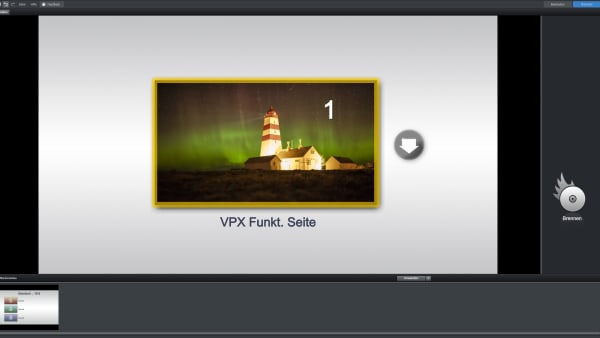
Disc authoring
Create DVDs and Blu ray Discs with professional menu templates or custom designs, and reuse saved templates for future projects.
Édition audio
Outils pros pour un son cristallin, mixage surround et support des plug-ins.
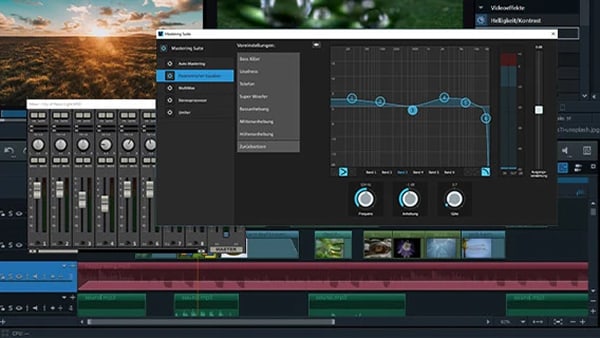
Qualité broadcast
Achieve crystal clear sound with smart audio cleaning tools, high end channel based effects via the integrated effects track, and EBU R 128 loudness normalization.

Son Surround 5.1
Create immersive 5.1 surround mixes and control every channel in real time using the integrated audio mixer.

Mixeur audio temps réel
Mix and adjust audio live with per-track effects such as equalizer, compressor, and delay for precise, professional sound control.

Interface VST2
Use third party VST plug ins for mixing, mastering, and audio restoration, and expand your audio toolkit at any time with additional plug ins.

Nettoyage audio intégré
Remove hissing, crackling, and wind noise in just a few clicks using built in noise reduction, compressor, equalizer, and StereoFX tools.




L'offre se termine dans
Tarifs
Obtenez Video Pro X maintenant
Trouvez la version de Video Pro X qui vous convient.


Classic
SPRING SALE
C$139.99
C$199.99
ÉCONOMISEZ 30%
Prix le plus bas des 30 derniers jours !
Acheter maintenant
SPRING SALE
C$89.99
C$199.99
ÉCONOMISEZ 55%
Prix le plus bas des 30 derniers jours !
Mettre à jour maintenant
Édition pro avec des outils précis.
- Outils d'étalonnage améliorés
- Stabilité de qualité broadcast
- Nettoyage audio par IA
- Support 8K complet
MEILLEURE OFFRE

Ultimate
SPRING SALE
C$169.99
C$239.99
ÉCONOMISEZ 29%
Prix le plus bas des 30 derniers jours !
Acheter maintenant
SPRING SALE
C$129.99
C$239.99
ÉCONOMISEZ 45%
Prix le plus bas des 30 derniers jours !
Mettre à jour maintenant
Suite complète avec outils d'image premium.
- Tout ce qui est inclus dans Classic, plus :
- 1 700+ filtres et effets haut de gamme
- proDAD VitaScene V5 Pro
- Stabilisation avancée et ralenti
- Plug-ins et contenus exclusifs
Foire aux questions
1. Que puis-je faire avec Vidéo Pro X ?
Vidéo Pro X est le logiciel de montage intuitif qui vous mène plus loin. Appliquez des effets cinématographiques et gardez le contrôle total sur l'audio.
2. Comment passer à Vidéo Pro X ?
Mettez à jour via le site MAGIX en suivant les étapes guidées de l'orderbox.
3. Quels formats sont supportés ?
Supporte tous les formats courants (MP4, AVI, MOV, etc.).
4. Combien coûte Vidéo Pro X ?
Consultez l'orderbox ci-dessus pour les tarifs.
Choisissez votre langue





















