Explore all features
Video deluxe combines intuitive editing, effects and color grading in one smart interface.
Editing features
Video deluxe keeps editing simple and intuitive with powerful tools in a streamlined workflow.

Edit videos
Cut, trim and arrange your footage with precision. A clear timeline and practical tools give you full control over every scene while keeping your workflow efficient.

Full track handling
Take full control of your timeline. Sort, rearrange and duplicate tracks freely, and cut, copy or delete them as needed. Color code tracks and objects to keep even complex projects organized.

Frame-precise keyframes
Control effects like movement, color and speed with frame accurate keyframes. Set markers exactly where you need them and fine tune every scene with precision.

Wizards
Import, optimize and start editing in minutes. Use smart wizards to automate tasks or fine tune settings your way. Fast results without slowing down your workflow.

×
Multicam editing
Edit events filmed with multiple cameras effortlessly. In multicam mode, preview up to four recordings at once and switch between angles with a click. Video deluxe handles the cuts automatically as you go.

×
Find and close gaps
Keep your timeline clean with automatic gap detection. The tool finds and closes empty spaces in your project instantly, saving valuable time, especially in larger edits.

×
Editing with real-time preview
Preview and trim your footage directly in the timeline. Hover, set cuts and refine clips instantly without interrupting your workflow. Perfect for handling large amounts of material and moving through rough cuts faster.

360° workflow
Edit 360° videos with a complete toolset built for immersive content. No 360° camera? Create dynamic 360° camera moves in photo panoramas and add a new perspective to your projects.
Optimization tools
Rescue imperfect footage, fine tune colors and transform the overall look of your video.

×
Professional video stabilization
Stabilize shaky footage in seconds. Powered by technology from the pro-level editor VEGAS Pro, the one click stabilization delivers smooth, high quality results.

Color grading
Shape the mood of your video with precise color grading tools. Adjust tones and fine tune individual hues to create a distinct, cinematic look that fits your story.

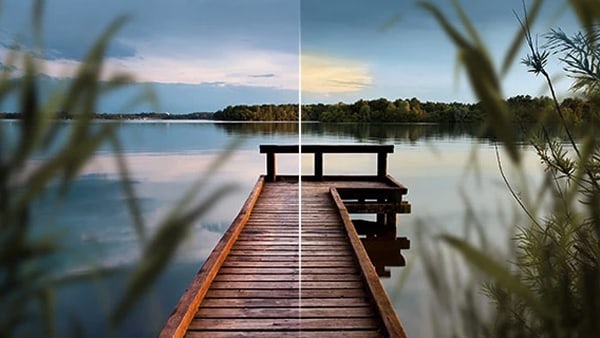
Deep Color
Edit in 16-bit Deep Color for greater precision and smoother gradients. Achieve richer detail and natural looking results without visible banding.
×
Automatic shot match
Match colors, brightness and contrast across your footage in seconds. The automatic shot match tool aligns clips to your best looking shots and keeps your project visually consistent.

Movie looks
Apply ready made film looks to shape the mood and atmosphere of your footage. Choose from pre set styles or create your own signature look with a single click.
Creative design
Highlight key moments and shape the mood with effects built for every project.

×
1.500 effects, titles & transitions
Explore a wide range of high quality intros, outros, titles, transitions and ready to use templates, including travel effects. New content is added regularly to keep your projects fresh.

×
Dynamic title animations
Add movement and personality with customizable title templates. Adjust size, style and fonts to match your footage and create a consistent look.

×
Layer masks
Use versatile layer masks to highlight key elements, build creative compositions and design distinctive titles for more polished transitions and effects.

×
Slow motion & time lapse
Create smooth slow motion and dynamic time lapse effects by adjusting clip speed. Intelligent frame interpolation generates additional frames for fluid playback, even from lower frame rate footage.

×
MAGIX Travel Maps
Visualize your journeys with customizable route animations. Choose from nine map styles or import your own, add locations and transport modes, and highlight each stop with photos and titles.
Impressive performance
Smooth previews, quick renders and reliable performance let you edit without interruption.

×
Infusion Engine
Video deluxe is powered by INFUSION Engine 3 and fully optimized for modern graphics cards from Intel, NVIDIA, and AMD. Enjoy smooth real-time previews during editing and noticeably faster exports.

8K UltraHD support
Edit and export in up to 8K resolution. The INFUSION Engine enables smooth real time playback, even with high resolution footage.

Extensive format support
Import, edit and export a wide range of formats with ease. Mix different file types in one timeline and work seamlessly with footage from action cams, camcorders, smartphones and drones.




Offer ends in
Pricing
Get Video deluxe now
Find the Video deluxe version that fits your needs.


Plus
Easy video editing with AI tools, templates and creative effects.
- Easy and seamless editing experience
- AI-powered tools
- Smooth playback and fast rendering
- Access to royalty-free stock content
- Over 2,000 effects, fades, and templates
BEST VALUE


Premium
Extended toolkit with 1,700 additional effects for more creative freedom.
- Everything in Plus, and:
- Add-on with over 1,700 effects and filters
- More quota for Hub services


Ultimate
Complete editing suite with advanced tools and content for polished videos
- Everything in Premium, and:
- 4 additional add-ons for more creativity
- 4 exclusive content packages
- Voucher for more Hub services quota
Frequently Asked Questions
1. What can I do with MAGIX Video deluxe?
MAGIX Video deluxe is an intuitive video editing software for both beginners and experienced users. You can edit your footage and audio, and apply effects, transitions, and titles with ease.
2. How can I upgrade to MAGIX Video deluxe?
You can upgrade directly through the MAGIX website. Just choose your preferred version from the orderbox and follow the guided steps.
3. Is MAGIX Video deluxe an easy video editing program?
Yes, MAGIX Video deluxe is one of the most user-friendly video editing programs available. It's perfect for beginners thanks to its intuitive interface, drag-and-drop functionality, and ready-to-use templates.
4. Which video formats does MAGIX Video deluxe support?
MAGIX Video deluxe supports all common formats, including MP4, AVI, MOV, and more. Find more info under specifications.
5. How much does MAGIX Video deluxe cost?
For information on pricing, simply check the orderbox above.
Select your language





















